Showing posts with label Interview Questions. Show all posts

Sunday, March 16, 2014

Monitoring Messages in TIBCO EMS

  • You can monitor messages processed by a destination as they are sent, received, or acknowledged
  • The $sys.monitor topic for monitoring messages has the following format. $sys.monitor.(D).(E).(destinationName). Where D is the type of destination, E is the event you wish to monitor, and destinationName is the name of the destination whose messages you wish to monitor.

Read more...

Sunday, February 23, 2014

what is the difference between service and soap pallete in TIBCO BW?

  • The Service resource allows you to create a web service that implements multiple operations offered over multiple transports.
  • where as Soap resource allows you to create a web service that implements single operation over single transport.

Read more...

Sunday, February 16, 2014

Implementing TIBCO BW Cache and Advantages

  • All the frequently used data can be placed in the cache. 
  • For Example, data frequently used in multiple processes for every page navigation.  Also combo box value drop down also frequently accessing the DB to get the values.
  • To avoid the frequent access db, at the time of server start-up, all these values can be keeping it in Cache for frequent usage.
Also we can setup Cache refresh for every 1 hr or 3 hr to make the updated values available in Cache without restarting the server.

Advantage:
  1. Minimize the DB hit.
  2. Improve the system performance.

Read more...

Sunday, January 26, 2014

Best practices of Checkpoint activity in TIBCO BW: HTTP, Transactions and CalledProcesses

To know the function of checkpoint Click Here
  • Do not place checkpoint right after a HTTP activity. 
In general, HTTP activities do not require a checkpoint as the socket for the HTTP request is closed when the process engine crashes. So on a restart, HTTP response activity will return an error.
  • Checkpoint should be placed outside of a transaction group
Checkpoint should not be placed within or in parallel to a transaction. Checkpoint activity should be placed outside of any transaction group.
  • You should be aware of the implication of a checkpoint when calling a process from another.
Checkpoints save the state of an entire process instance. By default when a process calls another process, the called process is executed in the same process instance as the calling process.
  1. When a checkpoint occurs in a sub-process, the checkpoint saves the state of the current process instance.
  2. When a checkpoint occurs in a spawned sub-process, the checkpoint saves only the state of the spawned process

Read more...

Sunday, January 19, 2014

About Checkpoint in TIBCO BW

  • A checkpoint saves the current process data and state so that it can be recovered at a later time in the event of a failure.
  • If a process engine fails, all the process instances can be recovered and resume execution at the location of their last checkpoint in the process definition.
  • Only the most-recent state is saved by a checkpoint. If you have multiple checkpoints in a process, only the state from the last checkpoint is available for recovering the process.
  • If you have checkpoints in your process definition, you must consider the side effects when you change your process definition and redeploy it because the check-pointed data during the previous engine runtime could be loaded into the modified process definition. Thus, the result could be unpredictable.
  • Checkpointing is an expensive operation because the engine’s process data should be written to and read from the database which is IO intensive.
  • The checkpoint data will be written to the database and can be shared between 2 fault tolerant engines.

Read more...

Wednesday, January 15, 2014

Iteration Group vs For Each Function in TIBCO BW

  • A potential misuse of iteration group is to put an iteration group around a mapping activity, as shown in Figure below. This will decrease the performance if iteration count is  more.
  • It is possible to iterate through the data using an xsl:for-each or xsl:for-each-group statement instead of using a group around a Mapper activity.
  • These functions obviously does not apply if multiple activities must be executed for each iteration.
  • If this is not the case it is much more efficient to use a single mapping activity utilizing the for-each function.

    Read more...

    Sunday, January 12, 2014

    Worked examples of shared variable and job shared Variable in TIBCO BW

    Shared Variables:
    • Shared Variable resource allows sharing data across process instances.
    • All process instances can read and update the data stored in a shared variable.
    • Shared variable is useful if a common set of values needs to be passed across all process instances 
    Example: A list of approval codes. A shared variable can be created to hold the current list of approval codes and create one process definition for setting the codes. You can then retrieve the shared variable in all processes that require the current approval codes.

    Job Shared Variables:
    • A Job Shared Variable resource is similar to a Shared Variable, but data CANNOT be shared across process instances. its scope is limited to the current job (A Job or Instance is nothing but one complete execution from START to END activity in a Process definition).
    • A copy of the variable is created for each new process instance (Variable is Initialized for every Job or Instance ).
    • This type of shared variable is useful for passing data to and from sub-processes without creating an input or output schema for the called process. 
    Example: Get Shared Variable and Set Shared Variable activities should be used to access the data instead of mapping data to a called processes input or output schemas. New process instances receive a copy of the Job Shared Variable, so data cannot be shared across process instances.

    If a called process has the Spawn configuration field checked, a new process instance is created and the process instance receives a new copy of the Job Shared Variable.

    Read more...

    Sunday, January 5, 2014

    What is TIBCO iProcess Modeler?

    • The TIBCO iProcess Modeler is used to analysis and document business processes as simple as possible, it is used for visual representation of your business process that is easy to follow and that can be enhanced or modify at any time.
    • The TIBCO iProcess Modeler is automatically started by the TIBCO iProcess Client when you want to create or edit procedures. From the TIBCO iProcess Modeler you can access the Step Definer, which enables you to design the forms for each step in your procedure.
    • Procedures are at the basics of Staffware operations and as a procedure/process definer .You are the one who will decide how to make manual procedures and paper documents into Staffware procedures and forms.
    To know about Tibco iProcess Engine Architecture Click Here.

    Read more...

    Sunday, December 29, 2013

    Communication between TIBCO iProcess Client and Engine.

    • The Tibco iprocess engine uses a client/server model for communication. Here we have two way communication path between each iprocess client and iprocess engine.
    • The communication protocol used for this communication is called Remote Procedure Call (RPC).
    • Any information updated/modified in client needs to be passed to iprocess engine for processing.

    Read more...

    Physical architecture of TIBCO iProcess engine

    The TIBCO iProcess engine can be installed in two ways.
    1. Installing the engine on  one server
    2. Installing the engine on  multiple servers.
    Installing the engine on  one server:
    • Installing the tibco iprocess engine on one server is know as Tibco  iprocess engine node  architecture.
    Installing the engine on  multiple servers:
    • Installing the tibco iprocess engine on multiple servers that all use the same database instance is known as “nodecluster”architecture.

    Read more...

    Sunday, December 22, 2013

    Iprocess engine architecture: IAPJMS (IAPJMS) and RPC Background (RPCBG)

    IAPJMS  (IAPJMS):
    • If activity monitoring is enabled on your TIBCO iProcess Engine, the BG process sends out a message when any of the TIBCO iProcess Engine activities that you have configured to monitor occur. This process is responsible for receiving messages from the BG process and routing these to the JMS topic or queue.
    RPC Background  (RPCBG):
    • This process handles synchronous RPC calls from the Jump To and Case Suspend features in the TIBCO iProcess Client.
    To know the processes operate in the background ClickHere
    To know the processes operate in the foreground ClickHere

    Read more...

    Iprocess engine architecture: Database Queue Daemon(DBQD) and Deadline Manager (DLMGR)

    Database Queue Daemon  (DBQD):
    • This process is only currently used on the DB2 version of the TIBCO iProcess Engine.
    • This process  processes RPC requests from the BG and WISMBD processes to dequeue messages from the database queue tables.
    Deadline Manager  (DLMGR):
    • This single process manages the deadlines that have been defined in a procedure using the iProcess Modeler.
    • At defined intervals, the Deadline Manager checks the outstanding_adresse table for expired deadlines. If deadlines have expired,the Deadline Manager sends an Mbox instruction to the background Mbox set. so that the case instruction process can process the deadlines for the case.
    To know the processes operate in the background ClickHere.

    Read more...

    Sunday, December 8, 2013

    Iprocess engine architecture: About Background (BG) processes

    • This process retrieves messages from the Mbox sets and then processes the case instructions in the messages. 
    • The number of Background processes is controlled by the Process Sentinels.
    • Each message contains the case instructions from which the Background can determine what actions to take. The Background interprets the business rules defined in the procedure  and routes work items to the necessary work queues or external applications.
    • The process makes decisions based upon the Staffware data and procedure definition instructions as to what happens in the business process next.

    To know the processes operate in the background ClickHere.

    Read more...

    Iprocess engine architecture: Case Prediction (BGPREDICT):

    • This process  receives messages from the Staffware Background processes.
    • When a case instruction that results in a change to a case has been processed, the Staffware Background processes notify the Case Prediction processes so that the prediction data (stored in the database) can be updated. There can be multiple case prediction processes running concurrently.
    • Each message contains information about the case that has changed and the procedure and instruction that caused the change.
    • The process will read messages from the queue(s) and update the predict table so that it contains the latest prediction information about the case that the queued message was for.
    To know the processes operate in the background ClickHere.

    Read more...

    Sunday, November 24, 2013

    Iprocess engine architecture: Background Processes


  • Background processes are responsible for processing message instructions received from the clients such as releasing a step or forwarding a step.
  •  And also monitor and process any deadlines that have been set up in the procedure and manage case prediction.

  • processes operate in the background:-
    1. Background  (BG)
    2. Case Prediction  (BGPREDICT)
    3. Database Queue Daemon  (DBQD)
    4. Deadline Manager  (DLMGR)
    5. IAPJMS  (IAPJMS)
    6. RPC Background  (RPCBG)
    For detailed information on foreground processes CLICK HERE

    Read more...

    Sunday, October 13, 2013

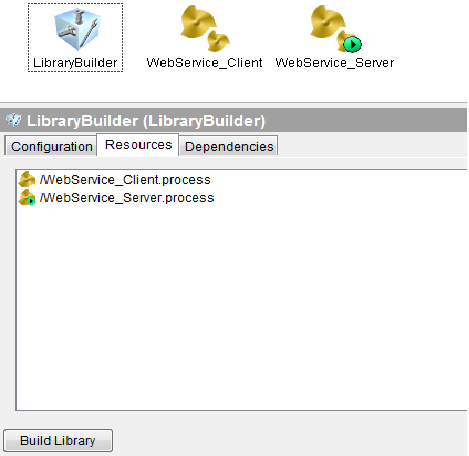
    LibraryBuilder: How to build and Import a Library file (.projlib) in TIBCO BW

    Note: For Project Library (.projlib) uses and advantages Click Here.

    How to build a Library file:

    1. Drag and drop LibraryBuilder resource from palettes pane into design pane.
    2. Select Resources tab and add resources by clicking binocular symbol located on the right side.
    3. After selected all the files to include in library and then click on Build Library button located at below as shown in below screenshot 2.

    How to Import a Library file:

    1. Open BW project
    2. click on the root folder (this reflects your bw projet name)
    3.In the config pane you will see the following tabs configuration, project settings, Design Time libraries.
    4. click on design time libraries.
    5. click on + sign and apply.
                                          
                                                            1.Import a .Projlib


    2. Building .projlib


    Read more...

    Thursday, October 10, 2013

    Project Library (.projlib) use and advantage in TIBCO BW

    Note:To know how to build and Import a Library file (.projlib) Click here.

    Project Library Usage:

    Project Library is very useful when the common functionalities are shared across the project.  All the common processes or functionalities are grouped together to make the separate common BW project for .projlib usage.

    we can reuse process developed by other teams if we build those processes as library file and then by importing into BW project in Tibco designer. This is a perfect approach when number of development teams working together on the same project.

    Once we build the library file, We can only export and import into our development projects to make use of it but we can’t modify inner logic of the processes. Team who have build the library file can only edit or modify the processes inside of the library file and rebuild.

    The imported processes of the Library builder looks in gray as you can see in the image below.

    Advantage of .projlib: 

    1. Reusable common process - Existing tested functionality will minimize the development effort.
    2. Uniformity of the Common process & functions are used across all projects.

    Read more...

    Sunday, October 6, 2013

    What is the use of Sequencing Key in TIBCO BW and How to configure it ?

    About Sequencing Key:
    • The sequencing Key allows BW to read more than one message at the same time but keep the order for messages which have the same Key.
    • Process instances can have sequencing keys that evaluate to different values, but only process instances with the same value for the sequencing key are executed sequentially. 
    • Process instances with different sequencing key values can be executed concurrently.
    • Example:
    Imagine the following messages in your queue:
    message1 / key: client1
    message2 / key: client2
    message3 / key: client1
    message4 / key: client1 

    With three session configured (i.e. Max Job = 3), BW will pull the first three messages (message 1 to 3).
    The message 1 and 2 will be execute concurrently while the message 3 will wait the end of the session of the message 1 (they have the same key). In other term, until you confirm the message 1 (or loose its session), the message 3 is in a wait status.

    How to set Sequencing Key in TIBCO BW:

    Sequencing Key can be specified on the “misc” tab of a process starter. For example, in below screenshot, a file poller activity is specified to sequence files based on their extensions (i.e. all ‘.txt’ will be processed sequentially; all ‘.pdf’ will be sequential etc.)

    Read more...

    Sunday, September 29, 2013

    What is the use of Critical Section Groups in BW ? what is the need of Synchronization for Shared Variables? Scope of Synchronization in CS Groups? How to use CS groups with no performance implications?

    Critical section groups are used to synchronize process instances so that only one process instance executes the grouped activities at any given time as shown in below screenshot-1.

    In general, concurrently running process instances does not wait for the completion of other instance as shown in below screenshot-2.

    Any concurrently running process instances that contain a corresponding critical section group wait until the process instance that is currently executing the critical section group completes as shown below.

     Screenshot-1

    How Synchronization works with Critical section groups:
    Multiple process instances can potentially access and assign values to Shared Variable resources, the Lock shared configuration object(by referencing shared configuration in configuration tab of the group) and critical section group allow you to synchronize access to Shared Variable resources.

    Scope of Synchronization:
    Critical section groups can be used to synchronize all process instances for a particular process definition in a single process engine or multiple process definitions or across multiple process engines by selecting the scope as Single Group or Multiple Groups in configuration pane.

    What is the need of Synchronization:
    Without a mechanism for locking, a process instance could update the value of a variable while another process instance is attempting to read the value. This would result in an unpredictable value for the variable.

    You should use critical section groups to contain the Set Shared Variable and Get Shared Variable activities.This ensures that only one process instance attempts to assign a value to the variable and ensures that no process assigns a value to the variable when the current process attempts to read the value.

    Best practices to use Critical Section Groups: 
    There may be performance implications when using these groups. In general, you should use the following guidelines when creating critical section groups:
    • Keep the duration of a Critical Section group as short as possible. That is, put only a very few activities in a Critical Section group, and only use activities that execute very quickly.
    • Do not include any activities that wait for incoming events or have long duration, such as Request/Reply activities, Wait For activities, Sleep activities, or activities that require a long time to execute.
    • Avoid nesting Critical Section groups. If you must use nesting, ensure that Lock shared configuration resources are used in the same order in all process definitions.Deadlocks can occur if you do not specify the Lock resources in the same order in nested Critical Section groups for all process definitions.
                                                           Screenshot-2

    Read more...

    Sunday, September 15, 2013

    Iprocess engine architecture: Foreground Processes- Mbox Set

    • The Mbox Sets are responsible for communicating information between the foreground and background processes. 
    • The Mbox messaging system stores and processes messages from Tibco iProcess Client or Tibco iProcess Engine requests. 
    • Mbox sets comprise of one or more message queues.
    The messaging system used:-

    In the UNIX Oracle and Windows Oracle versions, Oracle AQ. This is a transactional messaging system provided by the Oracle database.

    In the UNIX DB2 and Windows SQL Server versions, Staff ware's own transactional messaging system, which uses database tables provided by the DB2 or Microsoft® SQL Server database.

    For detailed information on other foreground processes CLICK HERE


    Read more...

    Popular Posts

      © Blogger templates The Professional Template by Ourblogtemplates.com 2008

    Back to TOP